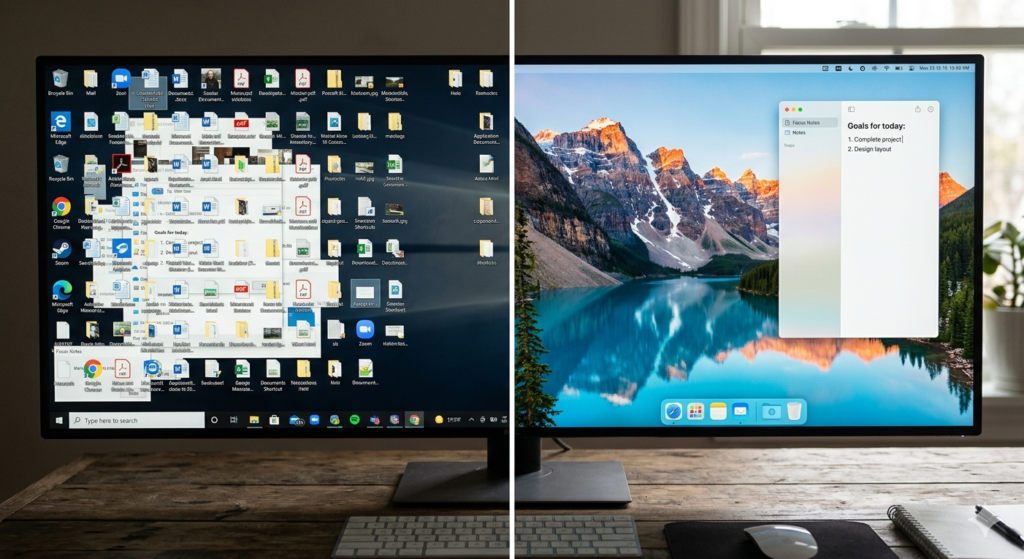
Opening your laptop to a screen completely covered in random files, overlapping windows, and hundreds of unread email notifications is a recipe for instant anxiety. Just like a messy physical office, a chaotic virtual workspace drains your mental energy. It forces your brain to process unnecessary visual information before you even begin your actual work.
If you spend ten minutes every morning searching for the right document, your system is failing you. This guide provides actionable digital decluttering tips to help you regain control. By systematically cleaning up the software side of your office, you can build a frictionless environment that supports focus rather than fighting it.
What Is Digital Decluttering?
Before you start deleting files, it is important to understand the goal of this process.
Digital decluttering is the intentional process of removing unnecessary files, apps, and accounts from your devices while organizing the remaining data into a logical system. It minimizes digital noise and creates a streamlined virtual workspace that enhances focus and reduces tech-induced anxiety.
It is not just about freeing up hard drive space. It is about treating your digital environment with the same respect as your physical environment.
Creating a Minimalist Desktop
The most impactful change you can make immediately is reclaiming your computer’s desktop. Your desktop is designed to be a temporary workspace, not a permanent filing cabinet.
To create a minimalist desktop, start by creating a single folder named “To Sort.” Select every file, screenshot, and shortcut currently sitting on your desktop and drag them into this folder. Instantly, your visual field is clear, drastically reducing digital noise.
Moving forward, adopt a strict rule: nothing stays on the desktop overnight. At the end of your workday, file the documents you used into their proper folders or delete them. This simple habit ensures you start every morning with a blank, calming canvas.
How to Organize Digital Files Systematically
Once your desktop is clear, you must address the hidden clutter on your hard drive. To effectively organize digital files, you need a predictable hierarchy.
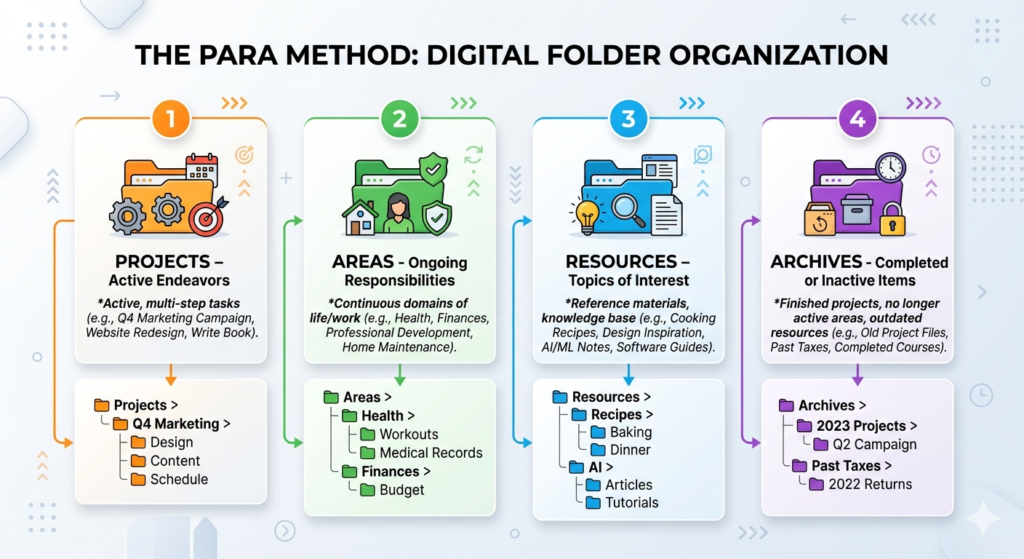
Avoid nesting folders too deeply. If you have to click through seven folders to find a tax document, your system is too complex. A popular and effective structure is the PARA method:
- Projects: Active tasks with a deadline (e.g., “Website Redesign”).
- Areas: Ongoing responsibilities (e.g., “Finances” or “Health”).
- Resources: Topics of interest or reference materials (e.g., “Design Inspiration”).
- Archives: Completed projects or inactive files.
Combine this shallow folder structure with a strict naming convention. Always use the date and a clear description (e.g., “2023-10-15_Q3-Marketing-Report.pdf”). This makes finding files via your computer’s search bar completely frictionless.
Conquering Email Inbox Zero
For many professionals, the email inbox is the ultimate source of digital stress. An inbox with 4,000 unread messages is essentially a massive to-do list created by other people.
Achieving email inbox zero does not mean you have zero emails; it means you have zero unprocessed emails. To get there, employ the “Touch It Once” rule. When you open an email, you must immediately make one of four choices:
- Reply: If it takes less than two minutes, do it now.
- Archive: If it contains information you might need later, move it out of the inbox.
- Delete/Unsubscribe: Be ruthless with promotional emails.
- Defer: Move tasks that require deep work to a dedicated task manager.
Applying this strict processing routine is a practical application of the philosophies discussed in our core guide, Digital Minimalism Meaning: A Guide to Intentional Tech Use. You are intentionally deciding what merits your attention and dismissing the rest.
The Importance of Reliable Backups
The biggest psychological barrier to digital decluttering is the fear of deleting something important. “What if I need this random PDF in three years?” This fear leads to digital hoarding.
The solution is to separate archiving from your daily workspace. Before you begin a massive purge of your computer, plug in a fast external SSD (for backups) and use software like Time Machine or Windows File History to copy your entire system.
Once you know a secure, offline copy exists in a drawer, you can ruthlessly delete old files, unused apps, and massive video clips from your main computer. Your daily machine stays lightning fast and uncluttered, while your historical data remains safely preserved.
Conclusion
Implementing these digital decluttering tips is not a one-time event; it is an ongoing practice of digital hygiene. By clearing your desktop, establishing a logical folder hierarchy, and rigorously processing your inbox, you remove the invisible friction that slows down your daily work.
A well-organized virtual workspace allows you to spend less time searching for information and more time actually doing the work that matters. Start small, perhaps by clearing just your desktop today, and gradually build a system that brings clarity to your digital life.
Frequently Asked Questions (FAQ)
1. How often should I declutter my computer?
A daily micro-declutter (like clearing your desktop at the end of the day) is ideal. For a deeper clean—such as organizing your “Downloads” folder, backing up files, and emptying the trash—scheduling 15 minutes once a week is highly effective.
2. Is it better to delete or archive old files?
Storage is relatively inexpensive, so archiving is generally safer than deleting, provided the archive is moved off your primary workspace. Move old files to an external drive or a dedicated “Archive” cloud folder so they do not clutter your daily search results.
3. How do I handle an inbox with thousands of unread emails?
Do not try to process them one by one. The most effective method is “Email Bankruptcy.” Search for emails older than 30 days, select all, and move them to an “Old Archive” folder. They are still searchable if you ever need them, but your primary inbox is instantly cleared, allowing you to start fresh.
4. Does digital clutter slow down my computer?
Yes. A nearly full hard drive significantly slows down your operating system, as the computer struggles to find space for temporary cache files. Additionally, having dozens of icons on your desktop requires your computer to constantly render those images, which can consume RAM.
5. What is the best way to handle digital photos?
Photos are notoriously difficult to organize. The best approach is to use dedicated photo management software (like Apple Photos or Google Photos) rather than manual folders. These programs automatically sort by date, location, and even facial recognition, removing the need for complex manual file naming.